Berikut link untuk download SAPGUI for Java for Linux versi 7.30 rev 9
http://adf.ly/1VCAJv
Selamat men-download !!
Showing posts with label SAP. Show all posts
Showing posts with label SAP. Show all posts
Friday, January 15, 2016

Monday, November 30, 2015
Video installation SAP NetWeaver 7.4 using Oracle 12c on SuSE Linux Enterprise Server 11 SP 4
This video show you on step by step installation of SAP NetWeaver 7.4
using Oracle 12c as database server on SuSE Linux Enterprise Server 11
SP 4.
Preparation :
Installation part 1 :
Installation part 2 :
Installation part 3 :
Installation part 4 :
Enjoy !!
Preparation :
Installation part 1 :
Installation part 2 :
Installation part 3 :
Installation part 4 :
Enjoy !!
Thursday, November 26, 2015
Installation SAP NetWeaver 7.4 using DB2 10.5 FP 3 on SLES 11 SP 4
Hi,
Lately I have upload some video on how to install SAP NetWeaver 7.4. I am using DB2 10.5 FP 3 as database server and using SuSE Linux Enterprise Server 11 SP 4.
Preparation check before installation.
Installation video.
part 1
part 2
Enjoy !!
Lately I have upload some video on how to install SAP NetWeaver 7.4. I am using DB2 10.5 FP 3 as database server and using SuSE Linux Enterprise Server 11 SP 4.
Preparation check before installation.
Installation video.
part 1
part 2
Enjoy !!
Tuesday, November 3, 2015
Video on how to apply SAP HANA License key via SAP HANA Studio
This video show you on how to apply SAP HANA license key which you have been ask from http://support.sap.com/licensekeys. Applying license key through SAP HANA Studio.
Enjoy !!
Enjoy !!
Friday, October 30, 2015
Video how to install SAP HANA Studio on SLES 11 SP 4
This video show you on how to install SAP HANA Studio on SuSE Linux
Enterprise Server 11 SP 4. We can use SAP HANA Studio to access, manage,
and maintain SAP HANA database server.
Enjoy !!
Enjoy !!
Thursday, October 29, 2015
Video how to install SAP HANA Server on SLES 11 SP 4
This video show you on how to install SAP HANA Server on SuSE Linux
Enterprise Server 11 SP 4 using GUI and text based. It’s easy to install
and to follow.
Enjoy !!
GUI based :
Text based :
Enjoy !!
GUI based :
Text based :
Sunday, October 25, 2015
Video Step by step upgrade SLES 11 SP 4 (with SAP ERP 6 EHp 5) to SLES 12
This video show you on how to step by step upgrade SuSE Linux
Enterprise Server 11 SP 4 (with SAP ERP 6 EHp 5 on it) to SuSE Linux
Enterprise Server 12.
There are few problems especially on uuidd (UUID daemon) and libuuid1 but it all solved. You can check it out.
Happy watching !!
There are few problems especially on uuidd (UUID daemon) and libuuid1 but it all solved. You can check it out.
Happy watching !!
Saturday, October 24, 2015
Video Upgrade SLES 11 SP 2 with SAP ERP 6 EHp 5 to SLES 11 SP4
I have installed SAP ERP 6 EHp 5 on SuSE Linux Enterprise Server SP
2.
Then I need to upgrade my OS from SLES 11 SP 2 to the latest version of SLES 11, which is SLES 11 SP 4.
Here are the video.
Then I need to upgrade my OS from SLES 11 SP 2 to the latest version of SLES 11, which is SLES 11 SP 4.
Here are the video.
Friday, October 2, 2015
Video – Howto Generate Solman Key without Solman Server
This video show you on how to generate solman key (you needed when
installing SAP ERP server) without having solman server. This little
trick is really helpfull.
Happy watching, guys !!
Happy watching, guys !!
Wednesday, January 8, 2014
Brief Description of SAP Executable
Here is a list of SAP executables that you may find on your SAP
systems. If you know of SAP exe files missing in from list, please leave
a comment:
R3check This is a tool that can check Cluster-Tables for errors.
R3ldctl The tool for exporting all table structures to the file system during an OS/DB-Migration.
R3load The table import & export tool of SAP during Installation, Upgrade and Migration.
R3szchk The tool for determine the sizes of the different tables in the target database during the import in an OS/DB-Migration.
R3ta Split large tables for export and import
R3trans This is the tool, that does the real work for tp. tp controls the import and export of changes and r3trans does them using scripts, that were generated from tp.
R3trans_164-20000978.SAR R3trans_164-20000978.SAR’ is a compressed archive with the latest version of R3trans from the SAP Service Marketplace, used when we patched the kernel.
SAPCAR SAP Compression and Archiving program
SAPEXEDB_159-20000976.SAR Compressed file containing DB Dependent executables
SAPEXE_159-20000978.SAR Compressed file containing the Database Independent executables
cfw GUI Control Framework for Abap Objects
cleanipc Cleans Inter-Process Communications Memory
db2jcllib.o Rsdb/db2jcl_library parameter
db2radm Used to configure DB2Connect
dbadaslib.o Part of lib_dbsl – database dependent SQL handler
dbdb2pwd Create an encrypted DB2 Password File
dbdb2slib.o Part of lib_dbsl – database dependent SQL handler – DB2
dbsdbslib.o Part of lib_dbsl – database dependent SQL handler
dev_sapstart Log file for starting sap
dipgntab Activation and adjustment of the nametabs with the ABAP Dictionary.
disp+work Dispatcher & Workprocess – “The complete Kernel” – Here the complete ABAP is processed …
Dpj2ee Dispatcher for Java
dpmon Used to get the process overview of an instance in text mode.
dsrlib.o Distributed Statistics Records
Dw_gui.o Dependent module for Disp+work
Dw_mdm.o Dependent module for Disp+work
Dw_stl.o Dependent module for Disp+work
Dw_xml.o Dependent module for Disp+work
Dw_xtc.o Dependent module for Disp+work
Eg2mon Monitor program for Extended Global Memory Segments (only for support)
Em2mon Monitor program for Extended Memory management (only for support)
emmon Test program for Extended Memory
enqt Check and Monitor the Enqueue Lock Table
enrepserver SAP Enqueue Replication Server
enserver SAP Enqueue Server
ensmon Enqueue Server Monitor Programs to monitor the enqueue server and the enqueue replication servers.
Es2mon Programs to monitor the enqueue server and the enqueue replication servers.
esmon Program to monitor the enqueue server and the enqueue replication servers.
estst Test program for the Extended Memory Segments (only for support)
evtd This program is able to trigger events within the SAP system. The tp tool uses this feature. It can be used as trigger for self-written interfaces as well.
exe_db2.lst The ‘*.lst’ files are text files used by sapcpe to determine which files to compare/copy on instance startup.
gateway.lst The ‘*.lst’ files are text files used by sapcpe to determine which files to compare/copy on instance startup.
gw.properties Gateway processes
gwmon Program gwmon (at operating system level) or SAP transaction SMGW monitors the SAP Gateway.
gwrd Program gwmon (at operating system level) or SAP transaction SMGW monitors the SAP Gateway.
icm.properties Tool to monitor and manage the Internet Communication Manager (ICM) from the SAP System (transaction SMICM).
icmadmin.SAR Tool to monitor and manage the Internet Communication Manager (ICM) from the SAP System (transaction SMICM).
icman Tool to monitor and manage the Internet Communication Manager (ICM) from the SAP System (transaction SMICM).
icmbnd Program to bind ports with numbers from 0 to 1023
icmon Internet Communication Manager (ICM) used for HTTP(S), SMTP based communication used to monitor and manage the Internet Communication Manager (ICM) from the SAP System (transaction SMICM).
instance.lst List of database-independent executables. These executables are valid for all database systems used by the SAP system.
instancedb.lst List of database-dependent executables. These executables can only be used with a particular database system.
ipclimits Reports IPC memory available to SAP at the OS level
j2eeinst.lst The ‘*.lst’ files are text files used by sapcpe to determine which files to compare/copy on instance startup.
jcmon Program to monitor and manage Java processes
jcontrol Program to control Java processes
jenqulib.jar Java Enqueue Library
jlaunch Program starts the Java processes
jlogunzip.jar Java Classes used to unzip archives (used from the sapstartsrv)
jperflib.jar J2EE client Jar file
jstartup.jar Java Startup Frame Work jar file
jstartupapi.jar J2EE Engine Monitoring API
jstartupimpl.jar J2EE Monitoring
ldap_rfc LDAP Connector
ldappasswd Store LDAP directory user and password
ldapreg LDAP Registration Service
lgtst Program to test the message server
libicudata30.a ICU Common Library – Part of the RFC SDK and are used for RFC connections.
libicui18n30.a ICU Common Library – Part of the RFC SDK and are used for RFC connections.
libicuuc30.a ICU Common Library – Part of the RFC SDK and are used for RFC connections.
libjenqulib.o Part of the RFC SDK and are used for RFC connections.
libjmon.so JMON Shared Library – Part of the RFC SDK and are used for RFC connections.
libjperflib.so Part of the RFC SDK and are used for RFC connections.
libregex.o Part of the RFC SDK and are used for RFC connections.
librfcum.o Dynamic Load Library – Part of the RFC SDK and are used for RFC connections.
libsapcsa.o CSA Shared Library – Part of the RFC SDK and are used for RFC connections.
libsapsecu.o SECU Shared Library – SAP seculib library used for default encryption. It’s referenced in the j2ee startup logs in the work directory.
libsapu16.so Part of the RFC SDK and are used for RFC connections.
libsapu16_mt.so Part of the RFC SDK and are used for RFC connections.
mdxsvr MDX Parser for RFC
memlimits The program memlimits lets you determine how much swap space is currently available in the host system.
msclients Shows running instances registered in the Message Server
msg_server Main Message Server executable
msmon Message Server Monitor Utility
msprot Monitor Message Server at the OS level
niping Program to test the SAP network layer and the SAProuter
rfcexec The tool to start other programs from within SAP (ABAP) on the OS level via the gateway on any other (or the same) server.
rfcexec.sec The tool to start other programs from within SAP (ABAP) on the OS level via the gateway on any other (or the same) server.
rfcping Ping the RFC layer
rscparulib.o Dynamic shared library with code page converter
rscpf2f Check installed locales for given list of languages. (Created for installation tools. Possibly unused.)
rscpf3f Find possible system code pages for given list of languages. (Created for installation tools. Possibly unused.)
rscpf_ars Test program for code page conversion, language handling and locales in combination with ‘rscparulib.o’. (only for support)
rscpf_db Test program for code page conversion, language handling and locales. This program will connect to database and also attached to shared memory of an instance if possible. (only for support)
rslgcoll Central System Logging Collector
rslglscs Show the Syslog specific parts of the shared memory segment ‘SCSA’. (mainly for support)
rslgsend Central System Logging Sender
rslgview View SAP Log at the OS level
rstrcscs Program creates a common memory segment for the SCSA, locates the trace switches block within it and initializes the trace switches block.
rstrfile R/3 system trace file tool
rstrlscs The command “rstrcscs r” removes that common memory segment again.
rstrsscs The command “rstrsscs” allows change to the switch settings in the trace switches block within the SCSA.
rsyn.bin For each kernel version of the R/3 System, there exists an appropriate file rsyn.bin which contains the ABAP/4 syntax description. It describes what to do when compiling an ABAP statement
sapccm4x CCMS Agent for Abap
sapccmsr CCMS Agent for Java
sapcontrol ’sapcontrol’ is used to stop/start/monitor the sap instances (for example, from the sapmc).
sapcpe This checks that the local executables are up to date each time an SAP instance that uses local executables is started.
sapcpeft Parameter file used by sapcpe
sapcpp46.o Virus Scan Adapter files (Note 964305)
sapdbmrfc RFC for SAPDB connections
sapevt This program is able to trigger events within the SAP system. The tp tool uses this feature. It can be used as trigger for self-written interfaces as well.
sapexec Call SAP Function Modules
sapftp FTP Client, that can be used from within the SAP system (from ABAP) to communicate with other FTP servers.
saphttp HTTP Client, that can be used from within the SAP system (from ABAP) to communicate with other HTTP servers – e.g. for interfaces.
sapiconv Program for the conversion of text files
sapkprotp Relocate a Content Server Repository
saplicense The Tool for the installation of a new SAP License. This is needed when the license expires e.g. because of a hardware change.
sapmanifest.mf Text file that contains the kernel patch level and is read by the JSPM (Java Support Package Manager).
sapmanifestdb.mf Text file that contains the database kernel patch level and is read by the JSPM (Java Support Package Manager).
sapmscsa SCSA Administration
saposcol The SAP Interface to the Operating System for Performance Data. The Operating System Collector collects CPU Usage, Disk Performance, Paging etc.
sapparar Reads the SAP Profile
sappfpar This tool can be used for checking the profiles after changes and before restarting the SAP system.
saproot.sh Script to set Root permissions necessary for some kernel programs
saprouter The program for the Router Connection from customers to SAP and vice versa.
sapsecin Generation of the PSE (Personal Security Environment)
sapstart Starts SAP processes
sapstartsrv Starts SAP processes
sapuxuserchk The program xuser is a tool from maxdb which stores the logon information to the DB. This utility program called by sapcontrol which is a program that uses the web service APIs of the ABAP and Java startup framework to control an instance from the command line.
sapwebdisp The SAP Web dispatcher is used for load balancing for a setting up an SAP Internet scenario. It is the only application that needs to be located in the DMZ. Everything “behind” this can (and should) be located in your intranet. So, only one port on one IP address needs to be opened to internet and the SAP Web dispatcher can handle the traffic with the different SAP instances.
sapxpg Program that starts programs on an external host. The tool for starting OS commands from within SAP Systems.
scs.lst The ‘*.lst’ files are text files used by sapcpe to determine which files to compare/copy on instance startup.
scsclient.lst The ‘*.lst’ files are text files used by sapcpe to determine which files to compare/copy on instance startup.
semd A Test Tool used to verify semaphore operations.
servicehttp The port number where the server should listen for HTTP requests.
shmd Related to Shared Memory
showipc Checks shared memory segments
sldreg SLD registration program
sldreglib.o SLD registration program
ssfrfc Secure Store and Forward (SSF)
startdb Program to start the database
startj2eedb Program to start the database (Java)
startrfc The tool is a very easy SAP command line interface to start all of the implemented function modules of SAP systems.
startsap Program to start SAP
stopdb Program to stop the database
stopj2eedb Program to stop the database (Java)
stopsap Program to stop SAP
tp The Transport Tool. This program coordinates the complete import and export of program and table changes made within the SAP system in order to transport them through the complete System Landscape.
vscan_rfc Virus Scan Adapter files (Note 964305)
wdispadmin.SAR Web Dispatcher Administration Interface archive program
wdispmon Web Dispatcher Monitor program
webdispinst.lst Web Dispatcher Administration Interface list
xml63d.o Virus Scan Adapter files (Note 964305)
R3check This is a tool that can check Cluster-Tables for errors.
R3ldctl The tool for exporting all table structures to the file system during an OS/DB-Migration.
R3load The table import & export tool of SAP during Installation, Upgrade and Migration.
R3szchk The tool for determine the sizes of the different tables in the target database during the import in an OS/DB-Migration.
R3ta Split large tables for export and import
R3trans This is the tool, that does the real work for tp. tp controls the import and export of changes and r3trans does them using scripts, that were generated from tp.
R3trans_164-20000978.SAR R3trans_164-20000978.SAR’ is a compressed archive with the latest version of R3trans from the SAP Service Marketplace, used when we patched the kernel.
SAPCAR SAP Compression and Archiving program
SAPEXEDB_159-20000976.SAR Compressed file containing DB Dependent executables
SAPEXE_159-20000978.SAR Compressed file containing the Database Independent executables
cfw GUI Control Framework for Abap Objects
cleanipc Cleans Inter-Process Communications Memory
db2jcllib.o Rsdb/db2jcl_library parameter
db2radm Used to configure DB2Connect
dbadaslib.o Part of lib_dbsl – database dependent SQL handler
dbdb2pwd Create an encrypted DB2 Password File
dbdb2slib.o Part of lib_dbsl – database dependent SQL handler – DB2
dbsdbslib.o Part of lib_dbsl – database dependent SQL handler
dev_sapstart Log file for starting sap
dipgntab Activation and adjustment of the nametabs with the ABAP Dictionary.
disp+work Dispatcher & Workprocess – “The complete Kernel” – Here the complete ABAP is processed …
Dpj2ee Dispatcher for Java
dpmon Used to get the process overview of an instance in text mode.
dsrlib.o Distributed Statistics Records
Dw_gui.o Dependent module for Disp+work
Dw_mdm.o Dependent module for Disp+work
Dw_stl.o Dependent module for Disp+work
Dw_xml.o Dependent module for Disp+work
Dw_xtc.o Dependent module for Disp+work
Eg2mon Monitor program for Extended Global Memory Segments (only for support)
Em2mon Monitor program for Extended Memory management (only for support)
emmon Test program for Extended Memory
enqt Check and Monitor the Enqueue Lock Table
enrepserver SAP Enqueue Replication Server
enserver SAP Enqueue Server
ensmon Enqueue Server Monitor Programs to monitor the enqueue server and the enqueue replication servers.
Es2mon Programs to monitor the enqueue server and the enqueue replication servers.
esmon Program to monitor the enqueue server and the enqueue replication servers.
estst Test program for the Extended Memory Segments (only for support)
evtd This program is able to trigger events within the SAP system. The tp tool uses this feature. It can be used as trigger for self-written interfaces as well.
exe_db2.lst The ‘*.lst’ files are text files used by sapcpe to determine which files to compare/copy on instance startup.
gateway.lst The ‘*.lst’ files are text files used by sapcpe to determine which files to compare/copy on instance startup.
gw.properties Gateway processes
gwmon Program gwmon (at operating system level) or SAP transaction SMGW monitors the SAP Gateway.
gwrd Program gwmon (at operating system level) or SAP transaction SMGW monitors the SAP Gateway.
icm.properties Tool to monitor and manage the Internet Communication Manager (ICM) from the SAP System (transaction SMICM).
icmadmin.SAR Tool to monitor and manage the Internet Communication Manager (ICM) from the SAP System (transaction SMICM).
icman Tool to monitor and manage the Internet Communication Manager (ICM) from the SAP System (transaction SMICM).
icmbnd Program to bind ports with numbers from 0 to 1023
icmon Internet Communication Manager (ICM) used for HTTP(S), SMTP based communication used to monitor and manage the Internet Communication Manager (ICM) from the SAP System (transaction SMICM).
instance.lst List of database-independent executables. These executables are valid for all database systems used by the SAP system.
instancedb.lst List of database-dependent executables. These executables can only be used with a particular database system.
ipclimits Reports IPC memory available to SAP at the OS level
j2eeinst.lst The ‘*.lst’ files are text files used by sapcpe to determine which files to compare/copy on instance startup.
jcmon Program to monitor and manage Java processes
jcontrol Program to control Java processes
jenqulib.jar Java Enqueue Library
jlaunch Program starts the Java processes
jlogunzip.jar Java Classes used to unzip archives (used from the sapstartsrv)
jperflib.jar J2EE client Jar file
jstartup.jar Java Startup Frame Work jar file
jstartupapi.jar J2EE Engine Monitoring API
jstartupimpl.jar J2EE Monitoring
ldap_rfc LDAP Connector
ldappasswd Store LDAP directory user and password
ldapreg LDAP Registration Service
lgtst Program to test the message server
libicudata30.a ICU Common Library – Part of the RFC SDK and are used for RFC connections.
libicui18n30.a ICU Common Library – Part of the RFC SDK and are used for RFC connections.
libicuuc30.a ICU Common Library – Part of the RFC SDK and are used for RFC connections.
libjenqulib.o Part of the RFC SDK and are used for RFC connections.
libjmon.so JMON Shared Library – Part of the RFC SDK and are used for RFC connections.
libjperflib.so Part of the RFC SDK and are used for RFC connections.
libregex.o Part of the RFC SDK and are used for RFC connections.
librfcum.o Dynamic Load Library – Part of the RFC SDK and are used for RFC connections.
libsapcsa.o CSA Shared Library – Part of the RFC SDK and are used for RFC connections.
libsapsecu.o SECU Shared Library – SAP seculib library used for default encryption. It’s referenced in the j2ee startup logs in the work directory.
libsapu16.so Part of the RFC SDK and are used for RFC connections.
libsapu16_mt.so Part of the RFC SDK and are used for RFC connections.
mdxsvr MDX Parser for RFC
memlimits The program memlimits lets you determine how much swap space is currently available in the host system.
msclients Shows running instances registered in the Message Server
msg_server Main Message Server executable
msmon Message Server Monitor Utility
msprot Monitor Message Server at the OS level
niping Program to test the SAP network layer and the SAProuter
rfcexec The tool to start other programs from within SAP (ABAP) on the OS level via the gateway on any other (or the same) server.
rfcexec.sec The tool to start other programs from within SAP (ABAP) on the OS level via the gateway on any other (or the same) server.
rfcping Ping the RFC layer
rscparulib.o Dynamic shared library with code page converter
rscpf2f Check installed locales for given list of languages. (Created for installation tools. Possibly unused.)
rscpf3f Find possible system code pages for given list of languages. (Created for installation tools. Possibly unused.)
rscpf_ars Test program for code page conversion, language handling and locales in combination with ‘rscparulib.o’. (only for support)
rscpf_db Test program for code page conversion, language handling and locales. This program will connect to database and also attached to shared memory of an instance if possible. (only for support)
rslgcoll Central System Logging Collector
rslglscs Show the Syslog specific parts of the shared memory segment ‘SCSA’. (mainly for support)
rslgsend Central System Logging Sender
rslgview View SAP Log at the OS level
rstrcscs Program creates a common memory segment for the SCSA, locates the trace switches block within it and initializes the trace switches block.
rstrfile R/3 system trace file tool
rstrlscs The command “rstrcscs r” removes that common memory segment again.
rstrsscs The command “rstrsscs” allows change to the switch settings in the trace switches block within the SCSA.
rsyn.bin For each kernel version of the R/3 System, there exists an appropriate file rsyn.bin which contains the ABAP/4 syntax description. It describes what to do when compiling an ABAP statement
sapccm4x CCMS Agent for Abap
sapccmsr CCMS Agent for Java
sapcontrol ’sapcontrol’ is used to stop/start/monitor the sap instances (for example, from the sapmc).
sapcpe This checks that the local executables are up to date each time an SAP instance that uses local executables is started.
sapcpeft Parameter file used by sapcpe
sapcpp46.o Virus Scan Adapter files (Note 964305)
sapdbmrfc RFC for SAPDB connections
sapevt This program is able to trigger events within the SAP system. The tp tool uses this feature. It can be used as trigger for self-written interfaces as well.
sapexec Call SAP Function Modules
sapftp FTP Client, that can be used from within the SAP system (from ABAP) to communicate with other FTP servers.
saphttp HTTP Client, that can be used from within the SAP system (from ABAP) to communicate with other HTTP servers – e.g. for interfaces.
sapiconv Program for the conversion of text files
sapkprotp Relocate a Content Server Repository
saplicense The Tool for the installation of a new SAP License. This is needed when the license expires e.g. because of a hardware change.
sapmanifest.mf Text file that contains the kernel patch level and is read by the JSPM (Java Support Package Manager).
sapmanifestdb.mf Text file that contains the database kernel patch level and is read by the JSPM (Java Support Package Manager).
sapmscsa SCSA Administration
saposcol The SAP Interface to the Operating System for Performance Data. The Operating System Collector collects CPU Usage, Disk Performance, Paging etc.
sapparar Reads the SAP Profile
sappfpar This tool can be used for checking the profiles after changes and before restarting the SAP system.
saproot.sh Script to set Root permissions necessary for some kernel programs
saprouter The program for the Router Connection from customers to SAP and vice versa.
sapsecin Generation of the PSE (Personal Security Environment)
sapstart Starts SAP processes
sapstartsrv Starts SAP processes
sapuxuserchk The program xuser is a tool from maxdb which stores the logon information to the DB. This utility program called by sapcontrol which is a program that uses the web service APIs of the ABAP and Java startup framework to control an instance from the command line.
sapwebdisp The SAP Web dispatcher is used for load balancing for a setting up an SAP Internet scenario. It is the only application that needs to be located in the DMZ. Everything “behind” this can (and should) be located in your intranet. So, only one port on one IP address needs to be opened to internet and the SAP Web dispatcher can handle the traffic with the different SAP instances.
sapxpg Program that starts programs on an external host. The tool for starting OS commands from within SAP Systems.
scs.lst The ‘*.lst’ files are text files used by sapcpe to determine which files to compare/copy on instance startup.
scsclient.lst The ‘*.lst’ files are text files used by sapcpe to determine which files to compare/copy on instance startup.
semd A Test Tool used to verify semaphore operations.
servicehttp The port number where the server should listen for HTTP requests.
shmd Related to Shared Memory
showipc Checks shared memory segments
sldreg SLD registration program
sldreglib.o SLD registration program
ssfrfc Secure Store and Forward (SSF)
startdb Program to start the database
startj2eedb Program to start the database (Java)
startrfc The tool is a very easy SAP command line interface to start all of the implemented function modules of SAP systems.
startsap Program to start SAP
stopdb Program to stop the database
stopj2eedb Program to stop the database (Java)
stopsap Program to stop SAP
tp The Transport Tool. This program coordinates the complete import and export of program and table changes made within the SAP system in order to transport them through the complete System Landscape.
vscan_rfc Virus Scan Adapter files (Note 964305)
wdispadmin.SAR Web Dispatcher Administration Interface archive program
wdispmon Web Dispatcher Monitor program
webdispinst.lst Web Dispatcher Administration Interface list
xml63d.o Virus Scan Adapter files (Note 964305)
Monday, January 6, 2014
DB2 Optimized for SAP – Set it and forget it
You may have read that the last release of DB2 (8.2.2) was specifically Optimized for SAP.
What exactly does that mean? Well in this and the next few postings
I’ll describe exactly what new features were in 8.2.2 and how, if you
are using SAP (and even if you are not), you can take advantage of these
new features.
The first is what I like to call the One SAP Knob.
If you administer an SAP database then you likely know that there are a number of settings SAP strongly recommends that you set. This is not a big issue when you initially get started but as new versions of DB2 and/or SAP come out it can be a burden to read through all the release notes to find out what new registry variables should be set and/or what changes to existing registry variables should be made. Well if you are on 8.2.2 your life has just gotten easier. You can turn the SAP Knob to the ON position and forget about it. What do I mean? Well there is a new registry variable in DB2 8.2.2 called DB2_WORKLOAD. If you run
db2set DB2_WORKLOAD=SAP
this will automatically set a number of registry variables based on what IBM and SAP have determined to be the optimal settings. Think of this as a parent setting which takes care of all the children registry variables underneath it. If a future fixpack of DB2 or release of SAP has new or more optimal (if that’s even correct grammar) registry settings, DB2 will automatically adjust them as long as the DB2_WORKLOAD setting is set to SAP. If you want to see what registry variables are controlled by the DB2_WORKLOAD variable, you can run
db2set -gd DB2_WORKLOAD=SAP
and you will see a list of 17 registry variables and their settings, specifically designed in cooperation with SAP to tune DB2 optimally for an SAP workload.
The first is what I like to call the One SAP Knob.
If you administer an SAP database then you likely know that there are a number of settings SAP strongly recommends that you set. This is not a big issue when you initially get started but as new versions of DB2 and/or SAP come out it can be a burden to read through all the release notes to find out what new registry variables should be set and/or what changes to existing registry variables should be made. Well if you are on 8.2.2 your life has just gotten easier. You can turn the SAP Knob to the ON position and forget about it. What do I mean? Well there is a new registry variable in DB2 8.2.2 called DB2_WORKLOAD. If you run
db2set DB2_WORKLOAD=SAP
this will automatically set a number of registry variables based on what IBM and SAP have determined to be the optimal settings. Think of this as a parent setting which takes care of all the children registry variables underneath it. If a future fixpack of DB2 or release of SAP has new or more optimal (if that’s even correct grammar) registry settings, DB2 will automatically adjust them as long as the DB2_WORKLOAD setting is set to SAP. If you want to see what registry variables are controlled by the DB2_WORKLOAD variable, you can run
db2set -gd DB2_WORKLOAD=SAP
and you will see a list of 17 registry variables and their settings, specifically designed in cooperation with SAP to tune DB2 optimally for an SAP workload.
Thursday, January 2, 2014
Blink 182′s song lyric on SAP standard report
Check this on your SAP system (use SE38).
If you’re interested in the lyrics of Blink 182′s song “Obvious” (I am not), have a look at the SAP report RDDPUTJZ_REQUEST_COMP_CHECK3 and scroll down to the bottom :
If you’re interested in the lyrics of Blink 182′s song “Obvious” (I am not), have a look at the SAP report RDDPUTJZ_REQUEST_COMP_CHECK3 and scroll down to the bottom :
comm1 = ‘DO NOT CHECK!’.Someone at SAP must’ve been very bored! They’re only human after all.
loop at screen.
if screen-group1 eq ‘CH0′.
screen-input = ’0′.
endif.
modify screen.
endloop.
* Blink 182
* Obvious
*
* I saw you again
* I think you used me again
* Should we try this before
* we give up and move on
* And pretend to restore
* what we have and hold on?
*
* At times like this
* It’s Obvious
*
* I saw you again
* I know you fucked him again
* Can you comfort yourself
* with the sense of revenge?
* Are you leaving me here
* with the taste of the end?
*
* It times like this
* It’s Obvious
* At times like this
* It’s obvious
*
* I saw you again and again and again
* There’s some room to move on to move on to move on
* And I saw you again and again and again
* How do we fix this if we never had vision? (2x)
*
* (At time like this)
* I saw you again and again and again
* There’s some room to move on to move on to move on
* (It´s obvious)
* And I saw you again and again and again
* How do we fix this if we never had vision? (2x)
Tuesday, April 10, 2012
Downloading .sca files (SAP_JTECHS.sca, SAP_BUILDT.sca, SAP-JEE.sca)
The .sca files can be downloaded from service.sap.com/swdc.
For downloading SAP_JTECHS.sca:
service.sap.com/swdc --> Support Packages and Patches --> " SAP NetWeaver" --> SAP NETWEAVER" --> SAP NETWEAVER 2004S" --> Entry by Component" -->Application Server Java --> SAP JAVA TECH SERVICES 7.00 --> #OS independent
For downloading SAP_BUILDT.sca:
service.sap.com/swdc --> Support Packages and Patches --> " SAP NetWeaver" --> SAP NETWEAVER" --> SAP NETWEAVER 2004S" --> Entry by Component" -->Application Server Java --> DI BUILD TOOL 7.00 --> #OS independent
For downloading SAP-JEE.sca:
service.sap.com/swdc --> Support Packages and Patches --> " SAP NetWeaver" --> SAP NETWEAVER" --> SAP NETWEAVER 2004S" --> Entry by Component" -->Application Server Java --> SAP J2EE ENGINE 7.00 --> #OS independent
Monday, April 9, 2012
SAP idle session time out / Logging off inactive users
Logging off the inactive users is not set up by default. Setting up the feature of logging off the users improves the security as unattended terminals do not stay active indefinitely.
To activate automatic logging off, do the following:
- Go to Profile Maintenance by choosing Tools --> CCMS --> Configuration --> Profile Maintenance or the transaction RZ11.
- Maintain the parameter rdisp/gui_auto_logout. Enter the required number of seconds of inactivity before the user is logged off automatically.
Friday, April 6, 2012
Downloading pre-configured Smart Forms
Procedure to download the pre-configured Smart Forms is explained in the SAP Note 595812
Detailed information regarding the Pre-configured Smart Forms is available at:
http://service.sap.com/preconfiguredforms OR
http://service.sap.com/smb/development/preconfiguredforms.
To download pre-configured Smart Forms package:
- Go to http://service.sap.com/installations, select tab "download".
- On the right hand side screen, locate navigation tree node
SAP Software Distribution Center->Download->Installations and Upgrades->Entry by Application Group. - In the main window (right hand side), follow the path SAP Best Practices->Best Practices for mySAP All-in-One-> PRECONFIGURED SMART FORMS. Different versions of pre-configured Smart Forms are available here for download.
Thursday, April 5, 2012
How to get List of transactions executed by a User in a specific period of time
To get the list of transactions executed by a user in a specific period of time:
- Go to ST03. Select choose for analysis. Choose only one application server at a time in case you have multiple application servers. Choose time period of your choice.
- In the next screen from menu choose GO TO-->PROFILES->-USER PROFILES. Here you will get the list on users who have worked on that application server.
- Double click on the required user and you will get all the transactions he/she has executed.
- In case you select TOTAL in step 1 and then follow the steps 2 and 3 you will only get the list of application server on which the user has worked and not the transaction details.
Wednesday, April 4, 2012
Do we need to really log-out and log-in again to make authorization changes effective?
Whenever any changes were made to the user authorizations, normally it is required to log-out and log-in again to make these changes effective.
Here is an alternative:
Execute the report RSUSR405 in SE38. This would refresh all user-related buffers and changes to the authorizations are made effective immediately..
Tuesday, April 3, 2012
Differences between the transactions SE09 and SE10
SE09 is the transaction code for workbench organizer. Workbench organizer is the set of utilities for development change management. All Development changes are tracked via Workbench organizer.
SE10 is for Customizing organizer. Customizing organizer is the set of tools for customizing change management. All customizing changes are tracked via customizing organizer.
SE01 is the main screen of the Change and transport Organizer. From here the administrator can achieve all tasks related to transport requests - such as create, change, view logs, display client/delivery transports, etc. SE09 and SE10 can also be accessed from here. However, not all developers might be granted access to this transaction.
Monday, April 2, 2012
How to check Speed & Quality of User Network Connection from SAP
If someone want to check speed and quality or IP address of the network connection, this can be checked by SAP system.
Following Procedure can be followed.
User Transaction OS01
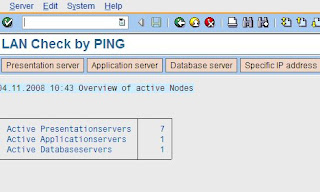
Following Procedure can be followed.
User Transaction OS01

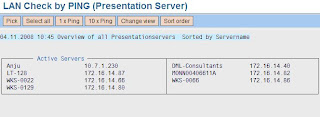
2. Click on the presentation Server and then click on the change view ‘tab’

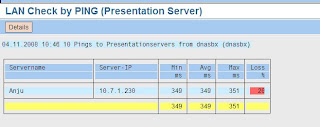
3. Here you can pick the network IP address & click on “10*Ping ” tab:

Here we can find the details. For better network speed switch to desired presentation server.
Friday, March 30, 2012
Report RSBTCDEL2 to delete old jobs
The job SAP_REORG_JOBS is a standard job which runs a report RSBTCDEL2 to delete old, canceled, inconsistent, non-deleted jobs from the system. But the SAP systems older than release 4.7 used RSBTCDEL report to delete the old jobs. But in those systems, after upgrade it may not run and create a dumpTSV_TNEW_PAGE_ALLOC_FAILED as the old jobs get accumulated and cause memory problem.
1. Create a new variant in Transaction SE38 specifying the number of day’s range after which the jobs need to get deleted from the system.

2. Change the job from released to scheduled and delete the old RSBTCDEL report. Schedule it with the new job RSBTCDEL2

click on save
The job will now work fine since the program and Variant have been replaced.
Subscribe to:
Posts (Atom)